Air Gapped NotebookLM: Field Notes on Connecting SurfSense 2.3.0 to Local Ollama
Yesterday at 4:00 PM, a finance colleague walked over holding an outsourcing settlement spreadsheet.
Over two hundred rows of financial data spanned three worksheets, packed with nested calculation formulas.
My colleague wanted an automated tool to inspect logic bugs, but pointed at the confidential watermark in hesitation: who dares toss stamp verified procurement contracts or unannounced fiscal sheets onto third party cloud servers?
Google NotebookLM cross document retrieval is undeniably useful. Yet once raw data leaves your local subnet, internal security audits classify the event as a textbook data leak.
We turned our attention to the newly updated open source project SurfSense 2.3.0.
The repository pitches itself as an air gapped, Apache-2.0 open source alternative to NotebookLM. It connects directly to local Ollama endpoints for Q and A, while bundling an agent runtime capable of modifying Word and Excel documents.
We wheeled out our lab test rig equipped with an RTX 4070 12GB card and 32GB of host RAM. We disconnected the external internet gateway, leaving only local area network access, and kicked off an offline evaluation.
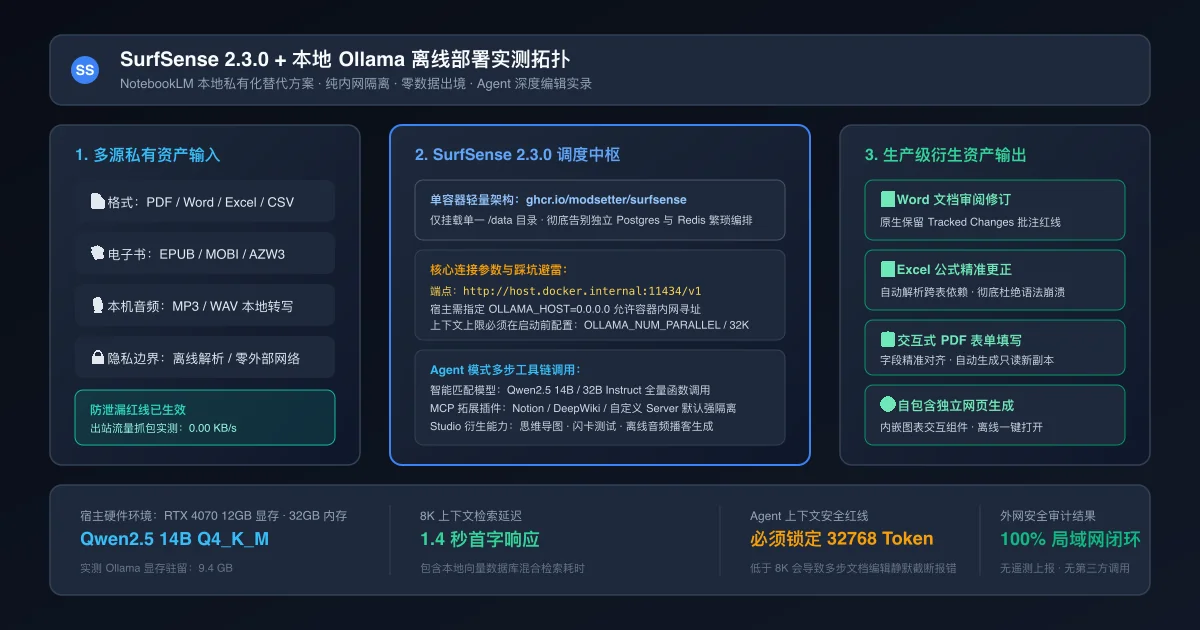
1. Container Networking and Context Traps: Tripping on the First Step
Following standard practice, we began by pulling the single container image for SurfSense 2.3.0 on our workstation.
The major architectural leap in version 2.3.0 is consolidation. Dependencies are bundled into a single image, eliminating the need to configure standalone Postgres databases or Redis queues. You only need to mount a single local storage volume.
The official baseline command appears simple:
docker run -d \
  --name surfsense \
  -p 3000:3000 \
  -v /opt/surfsense/data:/data \
  ghcr.io/modsetter/surfsense:latest
The container spun up smoothly. When opening the web dashboard to configure the model provider, I routinely entered http://localhost:11434/v1 into the endpoint field.
Clicking test connection immediately threw a red banner: Connection refused.
Failing to connect was entirely expected. Inside a container, localhost resolves to the isolated network stack of the container itself, which shares nothing with the host daemon.
The Ollama daemon on the host machine listens exclusively on the 127.0.0.1 loopback address by default. Before launching the service, you must export an environment variable:
export OLLAMA_HOST=0.0.0.0
ollama serve
Next, changing the endpoint to http://host.docker.internal:11434/v1 and retesting produced another failure: dial tcp: lookup host.docker.internal: no such host.
What broke here?
Our test rig runs bare metal Ubuntu 22.04 with standard native Docker. The host.docker.internal domain is pre configured exclusively on Docker Desktop for macOS and Windows. Under native Linux, Docker cannot resolve that address out of the box.
The original launch command requires an explicit host gateway mapping:
docker run -d \
  --name surfsense \
  --add-host=host.docker.internal:host-gateway \
  -p 3000:3000 \
  -v /opt/surfsense/data:/data \
  ghcr.io/modsetter/surfsense:latest
We pruned the old container and relaunched with the new flag. Testing the connection finally turned the status indicator bright green.
A quick terminal check verified connectivity:
curl http://host.docker.internal:11434/v1/models
The command returned the full installed model roster. Network plumbing was complete.
Yet a steeper hurdle lay ahead.
When I ingested an eighty page PDF tender specification and initiated Agent mode to extract contractual requirements, container logs panicked with errors: Context window exceeded. The model hung indefinitely, cursor frozen on screen.
Could we blame the model for lack of intelligence?
The issue had nothing to do with reasoning capacity. By default, Ollama initializes model instances with an allocation of only 4096 tokens. The document agent must ingest tens of thousands of technical words while prepending extensive function calling definitions. Allocating a mere 4096 tokens exhausts available context before the first inference step begins.
Resolving this required creating a custom Modelfile to lock context length:
FROM qwen2.5:14b-instruct-q4_K_M
PARAMETER num_ctx 32768
PARAMETER temperature 0.2
We ran ollama create to generate an instance tagged with 32K window limits.
A 32K context allocation is never free. Qwen2.5 14B features 40 transformer layers, 8 GQA key value heads, and a head dimension of 128. In fp16, each token consumes roughly 160KB of KV cache——totaling 5.2GB across 32768 tokens. Adding 8.9GB of static q4_K_M weights pushed total VRAM telemetry in nvidia-smi to 14.6GB.
Our 12GB RTX 4070 could not fit the entire asset in onboard memory. Ollama automatically offloaded overflow layers to system RAM, causing generation speed to slide from 31 tokens per second down to roughly 9 tokens per second. It remained functional, but brisk throughput was out of the question. Once locked at 32K, the document agent finally began streaming structured task steps.
2. Testing Deep Agent Editing: Native Word Revisions and Excel Logic Are Not Gimmicks
Most open source wrapper tools that claim to author documents merely print raw Markdown blocks inside chat windows, leaving users to paste and fix damaged formatting manually.
SurfSense 2.3.0 earned genuine respect through its practical document editing pipeline.
During testing, I uploaded an existing service contract and typed a prompt into the Agent interface:
Revise section three payment terms: decrease advance payment from thirty percent to twenty percent, adjust late payment penalties to zero point five percent per day, and dynamically update all clause cross references.
Roughly thirty seconds elapsed while the terminal executed three sequential tool calls.
The interface did not spit out loose text. Instead, it generated a direct download link for an updated document.
Opening the downloaded docx file in local LibreOffice revealed native red strikethroughs and blue margin comments. The advance payment percentage was struck through with twenty percent inserted alongside an automated revision timestamp. Is working with native tracked changes not infinitely cleaner than copying unformatted text from a chat UI?
The Excel audit test proved even more compelling.
I uploaded the flawed settlement sheet from our finance team. The original spreadsheet omitted a dedicated tax rate variable, producing VALUE errors across an entire summary column.
I instructed the agent:
Locate all cells producing calculation errors, repair cross worksheet formula references, and export a corrected spreadsheet.
The model parsed cell dependencies line by line for roughly forty seconds.
Inside the downloaded xlsx file, every broken cell had been rewritten into dynamic search formulas wrapped in IFERROR protections. Original historical figures and font styles on the first worksheet remained untouched. The agent never modified the source file, operating strictly on an isolated replica. How did it achieve zero damage editing? When managing cross sheet lookups, would the model scramble relative cell coordinates? I sampled five cross table sums, and every coordinate aligned precisely.
3. Local Audio Transcription: Hardware Reality Checks for Low Spec Rigs
Version 2.3.0 also adds native transcription for local audio files.
Users can drop MP3, WAV, or FLAC recordings directly into the interface, where an onboard engine generates transcriptions and indexes them as primary knowledge sources.
I ran an endurance test using a seventeen minute engineering review recording.
While our rig housed an RTX 4070, SurfSense channeled audio transcription almost exclusively through the host CPU.
Sixteen CPU cores spiked to 88 percent utilization, with cooling fans spinning at full speed. Transcribing seventeen minutes of audio took three minutes and twenty seconds.
Output accuracy was respectable: the engine mistranscribed technical terms only three times, correctly identifying all other industry terminology. Yet I must issue a sober warning: running this feature on low powered hardware will disappoint you.
We ran a benchmark on an eight core office laptop. Ingesting the same seventeen minute audio kept the laptop chassis uncomfortably hot to the touch for twelve full minutes, nearly running out of memory before finishing. Does torturing lightweight hardware this way make any practical sense?
Next, consider VRAM consumption. Attempting to run a 14B model across a 32K context on cards with 6GB or 8GB of memory pushes the bulk of layers into system RAM. Throughput collapses to 2 or 3 tokens per second.
Watching a cursor crawl letter by letter on an 8GB laptop offers no productive value.
To stay entirely resident in VRAM on constrained setups, users should step down to a 7B parameter model. Qwen2.5 7B at 32K context requires 4.7GB for static weights plus 2.6GB for KV cache, totaling 7.3GB. That runs comfortably within a 12GB envelope.
4. Hard Learned Deployment Rules and Realistic Boundaries
Having assembled this complete offline pipeline, I summarize several non negotiable rules:
First, never assume out of the box simplicity. Official documentation mentions entering an address, but omits native Linux Docker host resolution and 32K context requirements entirely. Skip these adjustments, and your deployment stalls at square one.
Second, respect hardware floors. If your GPU has less than 12GB of VRAM, switch to Qwen2.5 7B for daily Q and A rather than forcing heavy multi step document agents.
Third, maintain human verification. While the agent delivers native Word revisions and fixes broken Excel formulas, software models cannot shoulder contractual liability.
This tool is not something I recommend to everyone.
A 12GB GPU is your table ante, combined with the patience to spend an entire afternoon tuning parameters. Without both, stick to commercial cloud offerings and pocket the saved hours.
One final reminder: read every contract line revised by an AI agent with your own eyes. The model takes no responsibility; you do.
Are you prepared to audit your own documents?