Fully Local 3D Desktop AI Companion Yozakura: 8B VRAM Adaptive Fallback and Multimodal Stack Breakdown
Trying to host an always available 3D companion on your desktop usually stalls right at step one.
The hassle is overwhelming.
Commercial solutions either charge recurring subscriptions or siphon voice clips, chats, and screenshots to remote servers.
High network latency makes it worse.
Speak into the mic.
Audio uploads to the cloud.
Converts to text.
Calls an API.
Synthesizes voice and streams back down.
The cursor hangs idle for two or three full seconds.
The conversational flow shatters.
In a desktop environment, multi second delays completely wreck human machine interaction.
Reddit community developer u/Majestic-Trash4233 recently unveiled an architecture dubbed Yozakura.
Published on the Microsoft Store under developer Mizuho Soft with store product ID 9nk3v112fgbl, the app bundles three distinct characters named Tania, Saiyuu, and Ronald, requiring roughly 23GB of local offline assets and weights.
The developer posted the complete multimodal stack and scheduling pipeline across community forums.
The entire setup runs strictly local and offline.
Zero user accounts.
Zero subscription tiers.
Zero telemetric logs escaping to external hosts.
The system uses dynamic tiering: loading an 8B roleplay foundation when VRAM reaches 12GB, then automatically dropping to a 3B lightweight engine under tight memory constraints.
How do all these modular components link together on a single rig?
Will piling four separate neural networks onto one consumer GPU instantly trigger out of memory errors?
Following the published engineering schematics, we thoroughly audited the core components, hardware memory ledgers, and runtime pitfalls.
1. Engine Selection: Why Hermes 3 Beats Generic Instruct Models
Choosing the central brain for a desktop companion requires strict trade offs.
Many developers default to standard instruct versions of Llama or Qwen.
In repetitive daily tests, standard instruct models feel robotic.
Whenever conversational topics turn emotional, standard models preach like automated corporate representatives.
What about tiny models fine tuned exclusively on creative fiction?
They sound lively, yet their instruction following breaks on complex prompt constraints or multi turn memory lookups.
The developer selected Hermes 3 based on Llama 3.1 8B, quantized in Q4_K_M format.
Why this specific checkpoint?
The open source community rates Hermes 3 exceptionally high for roleplay immersion and strict structured output adherence.
It avoids breaking character or delivering patronizing lectures, maintaining consistent persona bounds.
Instead of heavy enterprise inference servers, the app embeds a lightweight Ollama runtime directly.
Model weights consume less than 5GB of active VRAM.
On a single consumer GPU, physical limits hit fast: pair an 8GB or 6GB card with downstream vision and speech models, and an 8B brain immediately causes memory allocation faults.
To prevent out of memory aborts, the developer implemented dynamic tiering:
System startup checks available GPU VRAM.
If dedicated VRAM is 12GB or higher, the engine loads full Hermes 3 8B Q4.
If VRAM falls below that safety threshold, the pipeline automatically falls back to Llama 3.2 3B.
Stepping down to 3B trades subtle wit for reliable token throughput, preventing fatal crashes on constrained hardware.
Adapting models to available VRAM prevents out of memory exceptions on modest cards.
2. Hearing, Vision, and Voice: Assembling the Multimodal Pipeline
With the brain running, the system needs ears, eyes, and vocal output.
Bloated external frameworks must be avoided.
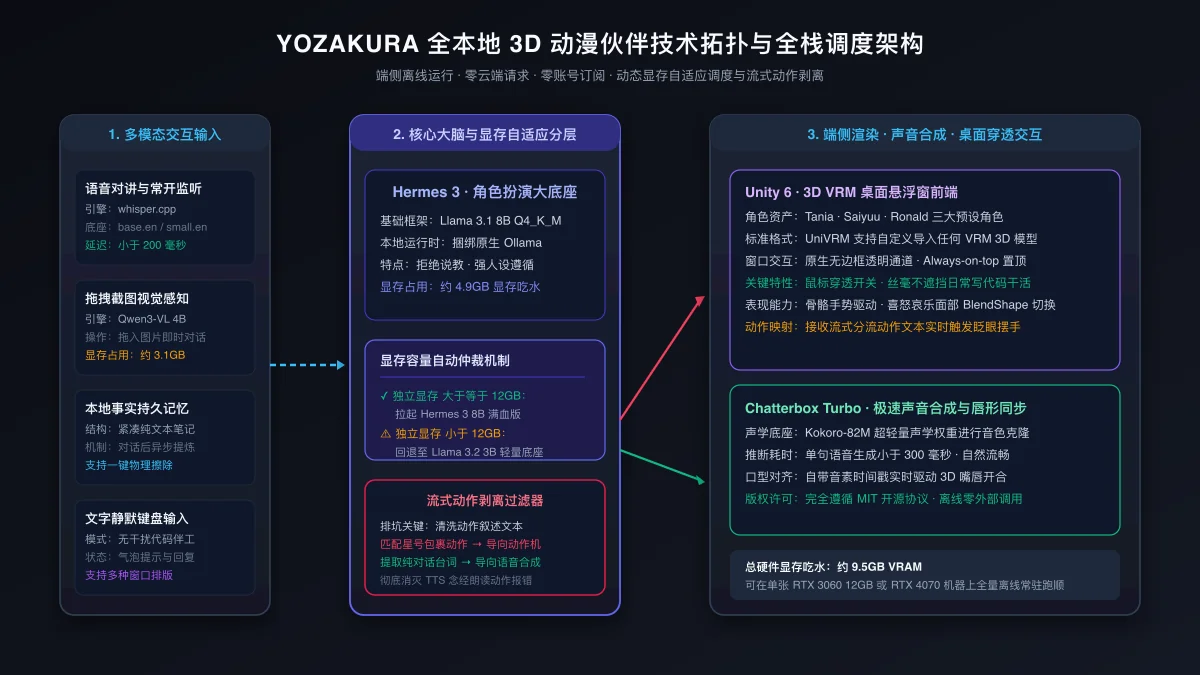
Here is how the lean multimodal pipeline fits together:
The first block handles hearing through speech to text.
The developer picked whisper.cpp written in pure C.
Why not deploy larger speech recognition checkpoints?
Local conversational interfaces demand minimal latency.
Running the base.en model consumes mere tens of megabytes of VRAM, with chunk transcription latency below 200 milliseconds.
Higher end rigs can swap to small.en for improved accuracy.
The second block provides vision through desktop captures.
The pipeline integrates Qwen3-VL 4B.
Dragging an image into the floating window lets the character analyze visual content and report observations on the fly.
The third and trickiest block is speech synthesis.
Commercial tools rely on proprietary cloud APIs: sweet sounding but fragile offline, with punishing per character bills.
The project uses open source Chatterbox Turbo alongside Kokoro-82M lightweight acoustic weights for zero shot voice cloning.
Inference is fast, generating complete sentences in under 300 milliseconds.
Crucially, it exports phoneme level timestamps.
Those timestamps allow the frontend rendering engine to drive 3D mouth meshes with millisecond lip sync precision.
Running four neural networks simultaneously on one machine demands clear hardware arithmetic.
Here is the active VRAM ledger:
Hermes 3 8B takes 4.9GB.
Qwen3-VL 4B takes 3.1GB.
whisper.cpp and Kokoro share roughly 1.2GB across system RAM and VRAM.
Total active footprint settles at approximately 9.5GB.
This means a single RTX 4070 12GB or RTX 3060 12GB card runs the entire pipeline locally without external compute.
3. Frontend Rendering and Local Memory: Transparent Overlay Engineering
Desktop tools often fail because their user interfaces feel clunky.
Full screen viewports hide active code, while plain windows block cursor clicks.
The frontend uses Unity 6, loading standard VRM character avatars.
The VRM format gives access to thousands of community anime assets that users can swap at will.
On Windows, the app taps native system APIs for borderless transparency with always on top capability.
It includes an interactive click through toggle.
When idle, the character sits peacefully atop editor borders or browser edges like a digital desk figurine.
Your mouse clicks pass straight through the character mesh to the background window without interrupting development work.
Input accommodates three modes: push to talk, continuous listening, and standard text typing.
Another pragmatic module is the local memory system.
Many desktop projects deploy heavy vector databases and separate container runtimes.
Does casual banter really justify loading a resource heavy vector engine?
In practical desktop hacking, vector overhead frequently outweighs benefits.
Yozakura relies on flat text notes:
Each character keeps a plain markdown file locally.
After a dialogue turn concludes, a background worker extracts short key facts, such as favorite musicians or current project names, and appends them to disk.
Subsequent wakeups inject this concise note into the system context window.
Local memory supports manual wipes: clicking reset memory truncates the text file to zero bytes, ensuring all data remains governed by the local filesystem.
4. Debugging in Practice: Filtering Spoken Stage Directions
Building custom companion pipelines inevitably surfaces quirky edge cases.
During early testing of similar pipelines, we ran into an awkward audio glitch.
Roleplay models love appending descriptive stage directions in asterisks.
For instance, the model outputs: Hello there, blinks curiously and tilts head.
Feeding that raw text straight to a speech synthesizer causes immediate trouble.
The TTS engine cannot distinguish spoken dialogue from theatrical actions.
Speakers recite every character aloud: Hello there asterisk blinks curiously and tilts head asterisk.
That mechanical recital ruins immersion.
Calling another LLM to clean formatting adds hundreds of milliseconds of latency that nobody wants.
The developer resolved this with a streaming regex filter.
As tokens stream from the LLM, a dual pointer buffer catches asterisks in real time.
Action phrases get routed directly to the Unity animation state machine, triggering blinks, smiles, or waving gestures.
Clean dialogue routes separately to the speech synthesizer for audio generation.
What happens if an action token splits across chunk boundaries?
Holding the dual pointer buffer whenever an opening asterisk lacks a closing counterpart prevents garbled text from reaching the TTS queue.
This stream filtering trims latency down to negligible overhead.
End to end response latency remains comfortably sub second.
5. Realistic Boundaries: Packaged Binary versus Custom Assembly
Evaluating this architecture requires engineering pragmatism.
When single GPU setups skip memory tiering and force oversized checkpoints, round trip response times stretch past five seconds, dragging conversational pacing down.
Yozakura distributes as a closed binary on the Microsoft Store without public source code.
Developers wanting full code autonomy can build upon this blueprint:
Run Ollama for LLM hosting.
Hook Chatterbox for lightweight TTS.
Attach an open source Unity VRM overlay for visual rendering.
Three practical rules stand out from testing:
First, never force 8B models on cards below 8GB VRAM.
Falling back to a 3B 4-bit model keeps frame rates and voice generation responsive.
Second, separate stage directions from spoken dialogue.
Skipping regex streaming turns your desk companion into a robotic script reader.
Third, keep algorithmic expectations realistic for small models.
Treat the desktop companion as a casual workspace friend rather than a heavy reasoning assistant.
With careful VRAM budgeting and streaming text filters, a single consumer GPU comfortably powers an offline multimodal companion.
When weighing closed convenience against complete hackability, do you prefer one click store installs or assembling your own transparent stack from open modules?