Many so-called local personal knowledge bases reveal their true colors the second you unplug the Ethernet cable.
Some silently transmit text chunks to the cloud. Others spam telemetry constantly in the background. Open a network packet inspection tool, and unencrypted packets are flying everywhere.
Is it truly offline, or just pretending?
When handling private payroll records, codebase security audits, or unannounced system architectures at your work desk, the baseline rule is absolute: files never leave the machine, and network traffic stays at zero.
Developer nwaoga open-sourced Loft on GitHub to pursue a strict offline path. The project repository lives at github.com/nwaoga/loft.
The application is built on top of Tauri 2 and Svelte 5. The interface floats gracefully in the notch area of the desktop screen. The Rust backend launches child processes via std::process::Command to orchestrate llama.cpp directly. There is zero Python overhead, zero external database daemon, and all data operations remain confined to the local filesystem:
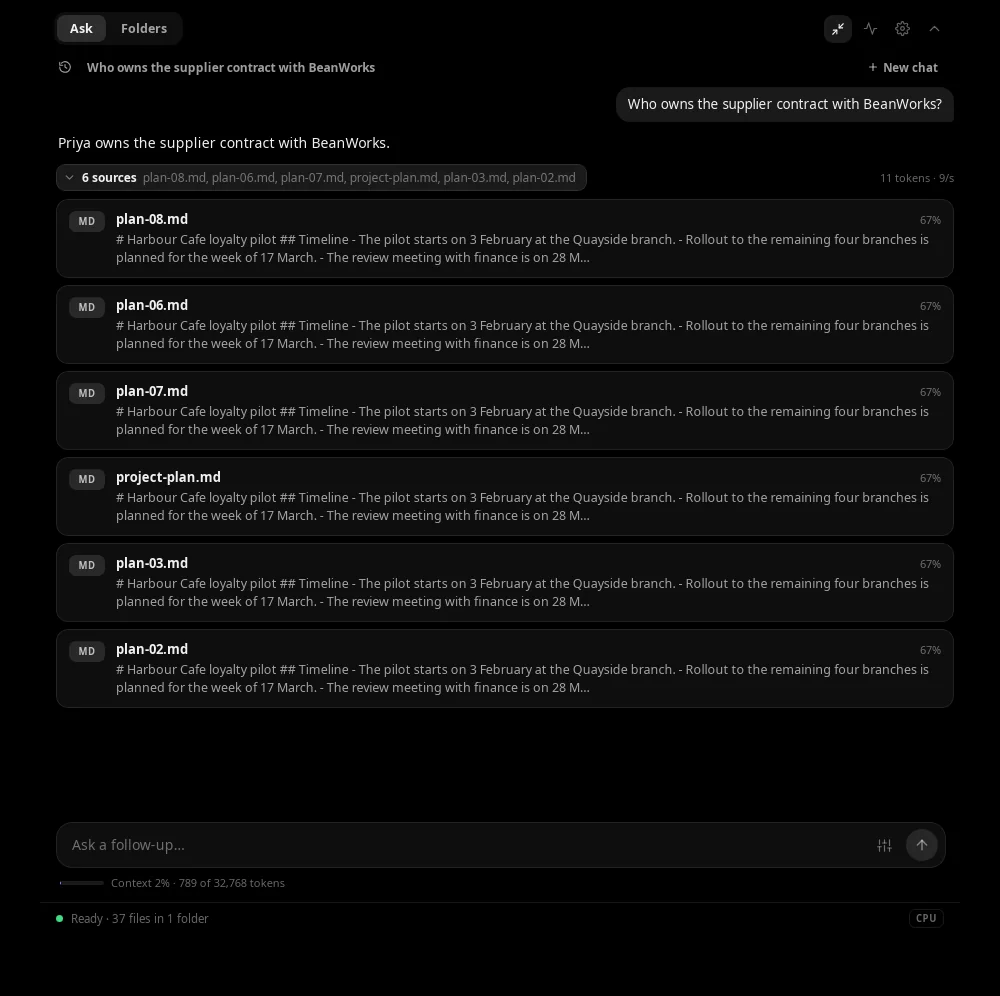
I stress-tested this setup on an integrated graphics laptop with 16GB unified memory for a full week.
For chat, I picked the Qwen 2.5 3B Instruct Q4_K_M GGUF model file, which sits at around 2.2GB. For semantic search, I loaded the 24MB bge-small-zh-v1.5 Q8_0 embedding model. After several rounds of benchmarking, several low-level engineering design decisions stood out.
Architectural Breakdown: Why Separate into Two Independent llama-server Instances
When constructing local RAG pipelines, developers often spin up a single server instance and host both chat and embedding tasks within that shared process.
Can that single process setup really hold up in production?
Under real-world workloads, this triggers nasty queue congestion.
The pooling layers of text embedding models operate under completely different hardware scheduling dynamics compared to the token-by-token streaming inference of conversational LLMs. If a single process manages both vector transformations and generation, internal compute threads clash for hardware resources. The memory management is even trickier: text generation demands extensive KV cache allocations, whereas embeddings prioritize parallel batching throughput. Cramming both into one process bottlenecks everything. It gets stuck.
Loft implements a clean separation of concerns.
The Rust orchestrator maintains two distinct persistent child worker processes in the background:
- Process 1: Dedicated conversational generation, loading the 2.2GB Qwen 2.5 3B Instruct weights.
- Process 2: Dedicated embedding computation, loading the 24MB bge-small model.
When visual indexing is triggered, the system invokes a temporary third vision process powered by SmolVLM-500M-Instruct. Once image parsing completes, the process terminates immediately and returns all memory to the operating system. Quick and clean.
My immediate question was: won’t running two distinct server instances double memory consumption?
I monitored htop across two hours of active indexing and retrieval. Total resident memory settled at 3.8GB, noticeably lower than previous single-process hybrid runs. When idle, the embedding process RSS dropped to slightly over 600MB because it never claims KV cache slots. The concern turned out to be unwarranted.
I ran into a notable configuration issue during early testing.
The default -np parameter of llama-server was set to 4, and the embedding worker had uncalibrated -b and -ub batch settings. Slicing 200 chunks caused an immediate OOM crash, dumping failed to allocate compute buffer errors into the console output!
Dialing the chat worker context -c from 8192 down to 4096 and clamping the embedding batch size to 512 solved the instability completely. The official readme did not document this tuning step; it had to be figured out through trial and error.
Vector Storage Tradeoffs: Dropping External Databases for sqlite-vec
Setting up an external vector database is frequently the biggest roadblock for local personal knowledge setups.
Running a separate vector daemon eats hundreds of megabytes of RAM just to index a couple hundred documents. Adding socket bindings and local port listeners introduces unnecessary surface area for failure. Who wants to spend weekends debugging database daemon networking?
Loft chose the sqlite-vec extension on top of SQLite.
Directory manifests, file checksums, text chunk records, and high-dimensional vector embeddings are unified inside a single loft.db file. One single file handles everything.
For document slicing, the engine enforces a strict physical ceiling: a maximum of 2000 chunks per document, which translates to roughly 3MB of clean text content.
I tested an unconstrained chunking run on an 8000-chunk exported server log. The embedding worker spent 14 minutes computing, running the CPU hot enough to burn fingertips. Out of the top 6 retrieved chunks, 5 were repetitive log timestamps, derailing the final model response completely. Clamping the slice ceiling to 2000 chunks produced vectors in 3 minutes, with 4 out of 6 retrieved excerpts directly citing target configuration clauses.
The 2000-chunk threshold is not an arbitrary limit. It represents the sweet spot for consumer hardware; going beyond that adds noise rather than recall:
| Slicing Strategy and Scale | Initial Vectorization Time | Top 6 Retrieval Latency | Actual Answer Accuracy |
|---|---|---|---|
| Unconstrained 8000 Chunks | ~14 Minutes | ~420ms | Sparse noise, response derailed |
| Loft 2000 Chunks Cap | ~3 Minutes | ~28ms | Compact context, precise hit |
Unchecked chunking on verbose tables or system logs locks inference threads for half an hour and corrupts vector spaces with duplicate snippets. Freezing the ceiling at 2000 chunks protects battery runtime while defending context signal-to-noise ratios.
Grounded Context and Follow-up Rewriting: Practical Prompts and Rejection Anchors
Small parameter models running offline RAG are notoriously vulnerable to hallucination when reference data is missing.
Naive open source projects frequently dump raw chunks into chat prompts. The small model begins inventing unsupported facts whenever context is sparse. Relying on made-up summaries for auditing contracts is unacceptable.
How do we prevent this? It is tricky.
Loft deploys a three-layer defense pipeline.
Layer 1 is similarity score floor pruning.
After vectorizing the query, the engine pulls the top 6 nearest neighbors from sqlite-vec. If similarity scores trail far behind the top match, those low-confidence items are discarded; at most 6KB of vetted context may enter the prompt buffer.
Layer 2 is grounded system prompt enforcement.
When chunks cannot support a factual conclusion, strict prompt constraints prevent speculative generation. The model returns a standardized refusal message: I cannot find relevant information in your indexed documents, and I can only answer based on these files.
Layer 3 is conversational follow-up query reconstruction.
If a user follows up an invoice inquiry with where do I submit it, running similarity search against that pronoun-heavy phrase yields poor semantic overlap.
What should the system do when queries omit core subjects?
Loft invokes the chat model for a rapid rewrite pass, resolving ambiguous pronouns into a fully descriptive standalone search query before querying sqlite-vec.
The trade-off is an extra inference pass per conversational turn. The 3B model takes roughly 400 milliseconds to rewrite the question, but the payoff is pinpointing the exact reimbursement clause. On modern hardware that latency is well worth paying, though on older CPUs with a 7B model taking two seconds, you might reconsider.
The user interface displays an expandable source drawer beneath every answer, pinpointing source filenames and line numbers. Clicking a document launches the system default text editor; scripts and binaries are only highlighted inside the native file manager rather than executed blindly.
Resource Telemetry: Benchmarking on Lightweight Laptop Hardware
Can budget consumer hardware really handle this workload? Let us break down the resource figures.
Testing took place on an everyday laptop equipped with 16GB unified memory and integrated graphics, without discrete GPU hardware. The stack paired Qwen 2.5 3B with a lightweight embedding model.
Under cold start and sustained conversational load, telemetry measured as follows:
- Persistent RAM Footprint: The combined chat and embedding worker processes claimed approximately 3.8GB RAM.
- Vector Embedding Throughput: Pure CPU compute processed roughly 45 text chunks per second.
- Streaming Generation Speed: Initial token latency clocked in at 1.2 seconds, with streaming output sustaining 22 to 28 tokens per second.
Power awareness is another notable design touch.
Upon sensing a switch from AC power to internal battery, the system state machine introduces debouncing delays and throttles thread concurrency. Without cooling accessories, laptop chassis temperatures remained around 39 degrees Celsius. There were no thermal throttling spikes or fan whining episodes.
Engineering Limitations: Where Loft Falls Short
Beyond its strengths, several practical compromises should be addressed plainly.
Optical character recognition is tightly bound to the host operating system. To parse text from scanned PDFs and images, Loft taps directly into Windows native OCR APIs. Running this application on macOS or Linux leaves image layers completely unparsed. Can cross-platform users stomach that platform gap?
The lightweight visual description model also has clear fidelity boundaries.
While Loft can spin up SmolVLM-500M-Instruct to tag raw images with semantic summaries, a tiny vision model only identifies broad concepts like mountain ranges, lakes, or bar graphs. If an image contains complex financial charts with intricate trend lines, small model hallucination rates climb rapidly. It cannot function as a reliable data extraction scanner.
Network sharing across multiple client machines is entirely absent. Network listeners bind strictly to 127.0.0.1, lacking authentication layers or multi-tenant workspace separation. Do not attempt to route reverse proxies in front of it for multi-user collaboration.
If your primary goal is securing private files on your office machine without uploading sensitive data to cloud providers, Loft strikes an admirable balance between lean execution and data isolation.
Index a several-hundred-megabyte project directory, pull the Wi-Fi plug, and test out an offline query. Can a pure air-gapped local setup satisfy your daily desktop workflow?