I opened the Hugging Face file tree for MiniMaxAI/MiniMax-H3-Image last night, added up the shard sizes, and nearly closed the tab right there.
Not only is the 33.1B backbone split into 12 BF16 shards, the maintainers also packed an entire duplicate transformer_diffusers/ tree and two VAEs into the same repository, while leaving the 66.7 GB text encoder over in MiniMaxAI/MiniMax-H3. Run a blind git clone without checking the tree and over 200 GB of SSD vanishes before a single pixel renders.
On that same November 10 cycle, three other pieces landed together: Google DeepMind opened general developer access to Gemini 4 Carbon, ComfyUI shipped v0.45.0 with PR #17655 trimming H3-Image for consumer cards, and 9to5Mac uncovered Apple’s internal Claris Harbor app for Thunderbolt 5 memory pooling.
Strip away the launch noise and it boils down to two engineering ledgers: how to stop frontier cloud models from burning silent reasoning tokens, and how desktop machines survive 100 GB-class open weights. Everything below is cross-checked against official posts, repository metadata, and merged PR notes—since I have not clocked bare-metal step latency on this release yet, I will not invent fake seconds per image.
The 135GB H3-Image Problem: Consumer GPUs Stall Without ComfyUI v0.45.0 Quants
MiniMax skipped building a small bespoke image net. Instead, they stripped the audio branch off H3-Omni and unified text-to-image plus multi-reference editing inside one checkpoint.
Check the raw weight footprint in the official README.md:
- The DiT backbone holds 33.1B parameters across 50 single-stream layers with a 5376 hidden size. In BF16 it weighs 66.28 GB, with FP32 embeddings, timestep, and output layers plus a 12 MB
pdd_fused_heads.safetensorshead file. - The text encoder reuses
Qwen3-VL-32Bunchanged fromMiniMax-H3, pulling hidden states from layer 50. That folder alone takes 66.7 GB. - The image VAE pairs a CNN encoder with a 24-layer ViT decoder at 16x spatial compression. Raw FP32 adds 2.34 GB.
Pure inference weights total 135.32 GB. Exclude the redundant Diffusers mirror directories before pulling files:
hf download MiniMaxAI/MiniMax-H3-Image --exclude "transformer_diffusers/*" "vae_diffusers/*"
hf download MiniMaxAI/MiniMax-H3 --include "text_encoder/*"
Despite the massive disk footprint, sampling is unusually short. The checkpoint is distilled down to 6 sampling steps with classifier-free guidance disabled—guidance_scale is pinned to 1. Native output sits around 16 MP directly, scaling from 4096x4096 at 1:1 up to 6272x2688 at 21:9 without a separate upscaler chain.
Here is the official side-by-side output between local SGLang serving and the MiniMax hosted API using identical seeds:

Before spinning this up inside an internal pipeline, two strict traps deserve attention.
First, strict parameter validation. Whether you serve behind SGLang or vLLM-Omni, /v1/images/generations only accepts num_inference_steps at 6 or omitted, and guidance_scale at 1 or omitted. Pass 20 steps out of SDXL muscle memory and the backend returns HTTP 400. negative_prompt is rejected outright as well; anything you want avoided must go into the positive description.
Second, geographic license exclusions. Read Section I.5 and Section IV of the root LICENSE file: the European Union, the United Kingdom, the Republic of Korea, and the United States sit under Excluded Territories. Even inside covered regions, exceeding 1 million USD in annualized revenue or offering a hosted API to third parties requires prior written authorization through platform.minimax.io/console/license. Global SaaS builders should pass this by counsel before self-hosting weights.
How do 24 GB and 32 GB consumer cards actually run it? ComfyUI v0.45.0 shipped on release day with PR #17655 from @kijai, adding the audio-free MiniMaxH3Image model class, the PDD head-bank scheduler, and the MiniMaxH3ImageConditioning node handling up to 16 <Picture N> reference images.
Comfy-Org also mirrored pruned and quantized builds on Hugging Face:
| Component | Mirrored Filename | Quantization | Size | Target Folder |
|---|---|---|---|---|
| Pruned DiT lossless baseline | minimax_h3_image_pruned_bf16.safetensors | Pruned BF16 | 40.23 GB | models/diffusion_models/ |
| Balanced DiT | minimax_h3_image_pruned_int8_convrot.safetensors | Pruned INT8 | 20.98 GB | models/diffusion_models/ |
| Minimal DiT | minimax_h3_image_pruned_w4a8.safetensors | Pruned W4A8 | 12.55 GB | models/diffusion_models/ |
| Text encoder INT8 | qwen3vl_32b_minimax_h3_int8_convrot.safetensors | INT8 | 27.14 GB | models/text_encoders/ |
| Text encoder FP4 | qwen3vl_32b_minimax_h3_nvfp4_awq.safetensors | NVFP4 AWQ | 15.69 GB | models/text_encoders/ |
| Lighter prompt expander swap | qwen3.5_9b_w4a8_gptq.safetensors | W4A8 GPTQ | 7.34 GB | models/text_encoders/ |
| Image VAE | minimax_h3_image_vae_fp16.safetensors | FP16 | 1.17 GB | models/vae/ |
Adding up the smallest viable stack yields 29.41 GB on disk. One detail in PR #17655 jumps out immediately: @kijai verified BF16 and INT8 generation at 1024 and 2048 on a single RTX 5090. How does a 32 GB card survive 40.23 GB BF16 or a combined 48 GB INT8 pass?
Through staged offloading and CPU block paging. Once the text encoder finishes, ComfyUI evicts it from VRAM before paging in the DiT for 6 Euler simple steps, then swaps in the 1.17 GB VAE. Systems under 64 GB of host RAM will choke trying to force BF16. Stick with W4A8 on 24 GB cards.
Still hitting OOM during multi-image edits? Drop target resolution first. ComfyUI’s default text-to-image template starts at 4 MP—2048x2048—on purpose rather than full 16 MP, and enabling the Resize Image/Mask node caps reference dimensions cleanly. Update to v0.45.0 anyway if you run Qwen 3.x or SeedVR2: the release also bundles linear weight fusion #17361, the FP8 text crash fix #17620, and adaptive free-VRAM VAE slicing #17508.
Gemini 4 Carbon Cost vs. Capability Ledger: Strong Long Context, Skip Blind Repo Routing
Following its October 28 Fairwind cybersecurity preview, Google DeepMind rolled Gemini 4 Carbon out to paid AI Studio developers, Android Studio, Gemini for business, and Google Antigravity on November 10.
The introductory pricing looks gentle at first glance, matching Argon: 2 USD per million input tokens, 10 USD per million output tokens, and 0.1 USD for cached input.
Check the footnote before flipping all traffic over. Once the promo window closes, rates double to 4 USD input and 20 USD output. The heavier leak is silent reasoning volume: DeepMind explicitly notes Carbon burns substantially more thinking tokens than Argon to verify long-horizon tasks. Routing routine CRUD edits here wastes budget fast.
Google’s own benchmark table spells out both strengths and real gaps:
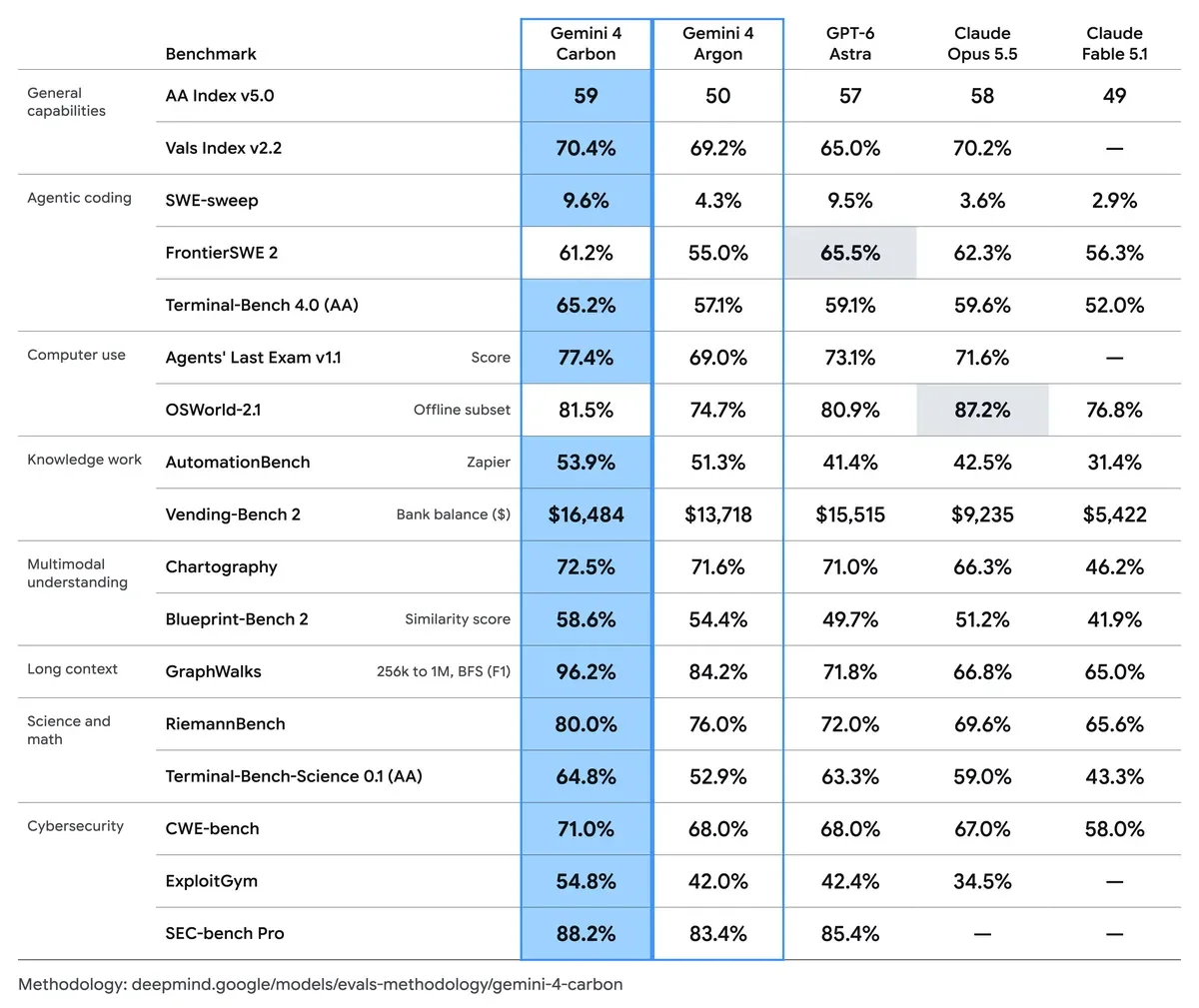
The routing rule is straightforward. Carbon hits 59 on AA Index v5.0 with standout long-context recall and security hardening, yet loses head-to-head on two practical tracks:
- Route million-token audits and security verification to Carbon. It reaches 96.2% F1 on
GraphWalks256k–1M—over 24 points clear of external rivals—hits 88.2% onSEC-bench Pro, and records 0.0% attack success on Gray Swan indirect prompt injection plus 0.0% cheating onTerminal-Bench 4.0. Pairing it as coordinator/auditor inside Antigravity’s preview/swarmworkflow keeps smaller workers disciplined. - Do not blindly route multi-file repository patches here. Carbon scores 61.2% on
FrontierSWE 2, trailingGPT-6 Astraat 65.5% by 4.3 percentage points. - Desktop GUI control stays behind as well. On the
OSWorld-2.1offline subset, Carbon lands at 81.5% compared toClaude Opus 5.5at 87.2%—a 5.7-point deficit. Split routes by task rather than buying on composite rank.
Apple Claris Harbor Leak: Hold Off Buying Macs for Thunderbolt 5 Memory Pools
Over on r/LocalLLaMA, 9to5Mac relayed findings from @aaronp613 showing Apple testing an internal app called Harbor under its Claris subsidiary.
The pitch skips terminal friction completely: search open-weight models in a GUI, download locally, and expose one or multiple Apple Silicon Macs as a private inference server with zero Conda or distributed launch scripts. Linking two or more machines over Thunderbolt 5 lets Harbor auto-discover peers and pool unified memory into one shared inference address space.
On paper, that aims straight at the 135 GB wall above. Running unquantized 66 GB encoders or 100B+ MoE weights at home used to mean wiring up MLX rings and SSH tunnels across multiple Mac Studios manually. Harbor wants plug-and-play clustering.
Keep your wallet closed for now. Harbor sits in Claris private preview with zero public ship date, no confirmed OpenAI-compatible API surface, and no verified diffusion kernel timings. Pooling unified memory buys 128 GB or 256 GB of capacity, not NVIDIA tensor core math speed. Pushing 16 MP DiT attention loops through Apple Silicon GPUs versus an RTX 5090 running FP4 kernels will likely lag badly—wait until real multi-Mac Studio throughput logs hit public repos before ordering hardware.
Every weight size, benchmark figure, and license clause above traces directly to primary pages:
| Verification Item | Primary Source URL |
|---|---|
| Gemini 4 Carbon availability and footnote pricing | https://blog.google/innovation-and-ai/models-and-research/gemini-models/gemini-4-carbon-now-available/ |
| Gemini 4 Carbon benchmark scores | https://blog.google/innovation-and-ai/models-and-research/gemini-models/introducing-gemini-4-carbon/ |
| MiniMax-H3-Image model card and specs | https://huggingface.co/MiniMaxAI/MiniMax-H3-Image |
| MiniMax license Excluded Territories | https://huggingface.co/MiniMaxAI/MiniMax-H3-Image/blob/main/LICENSE |
| ComfyUI PR #17655 merge record | https://github.com/Comfy-Org/ComfyUI/pull/17655 |
| ComfyUI deployment docs and templates | https://docs.comfy.org/tutorials/image/minimax/minimax-h3-image |
| Comfy-Org quantized safetensors files | https://huggingface.co/Comfy-Org/MiniMax-H3-Image |
| Apple Claris Harbor report | https://9to5mac.com/2026/11/10/apple-has-new-mac-app-coming-to-make-running-local-ai-models-easy/ |
If you are working off a 24 GB GPU, upgrade to ComfyUI v0.45.0, keep Resize Image/Mask switched on, and log host RAM paging on the W4A8 stack before committing it to production. On the API side, restrict Carbon to high-stakes audits and keep everyday coding on cheaper tiers. When you run large image or reasoning checkpoints locally right now, does your setup choke first on raw VRAM capacity or on PCIe swap latency?