Two monitors sit on my desk.
The left screen runs VS Code where I am sorting through a tricky merge conflict. The right terminal runs three local agents executing end-to-end integration tests concurrently.
I just started typing an interactive git rebase command in the left terminal. Suddenly, keystrokes stopped registering. The cursor froze mid-line.
Looking up, a Chromium window spawned by Playwright had popped to the front of the right screen without warning. System keyboard focus was completely hijacked. The shell commands intended for version control landed directly into the web search input.
Who would not get furious in that situation?
Anyone who has run similar workflows knows this headache. Whenever you are trying to write code, background browser popups jump out like ghosts to shatter your focus.
To stop windows from popping up, the instinctive reaction is switching automation scripts to headless mode. But in real-world engineering, headless mode often creates worse silent failures.
First is anti-bot detection. Many modern protected services immediately block headless browsers with 403 errors or drop connections entirely.
Second is black-box freezing. A page occasionally hangs on a hidden modal dialog or an unhandled JavaScript error. The terminal sits in a two-minute network timeout loop with zero logs while the process remains stuck. Where did it fail? Nobody knows. How are you supposed to debug that?
Then comes resource overhead. Playwright running Chrome instances eats resources heavily during multi-agent concurrency. Five idle tabs in the background consume 1.6 GB RAM. The GPU process pegs several CPU cores, spinning the machine fans loud.
Paul Nameless open-sourced agweb on GitHub specifically to fix these daily annoyances. The repository lives at github.com/paul-nameless/agweb. It throws out the heavy Chromium framework and docks directly onto the macOS native system WebKit engine.
I plugged it into my local workflow for two days. Here is the realistic engineering breakdown.
Focus Hijacking and Memory Footprint: Playwright Chrome vs Native WebKit
Playwright works well for standard browser automation. But porting it directly onto autonomous coding agents causes friction. Traditional frameworks treat every session as an isolated full browser instance. Once three agents run in parallel, Activity Monitor stacks up three distinct GPU contexts and graphics pipelines.
Look at the physical memory and idle energy accounting first. Numbers do not lie.
On an M2 Max test machine with five complex document and test pages open, I tracked three runtime setups:
| Runtime Architecture | Five Idle Tabs Physical RAM | Idle CPU Load | Focus Hijacking Behavior |
|---|---|---|---|
| Playwright Native Chrome | Around 1.6 GB RAM | 5 to 7 cores fluctuating | Frequent popups stealing focus |
| Headless Chrome Mode | Around 730 MB RAM | 2 to 3 cores light wakeups | Zero visible popups, silent blocks |
| Agweb Native WebKit Daemon | Around 590 MB RAM | Near 0% static suspension | Single window background, zero theft |
The most significant gap lies in idle tab suspension.
Chrome background rendering architecture keeps timers and event loop polling alive for non-active pages. In contrast, Agweb leverages the deep suspension mechanism built into macOS WebKit.
I monitored CPU usage for ten minutes. Once agent actions stopped, the two WebKit rendering processes dropped from 6.8% to 0.3% within three to five seconds, staying dormant. Not strictly zero, but light enough to ignore.
Keyboard interaction brings an even bigger improvement.
Agweb handles file picking, confirmation prompts, and downloads via terminal CLI commands answered directly by agents. No native OS modal popups appear on screen. Click and keypress events simulate OS-level event streams with smooth movement paths, ensuring hover menus and drag elements trigger normally.
I write my code, and it runs its workflow. The cursor stays at the end of my line without twitching once.
Pressing Command+D opens a unified multi-task dashboard:
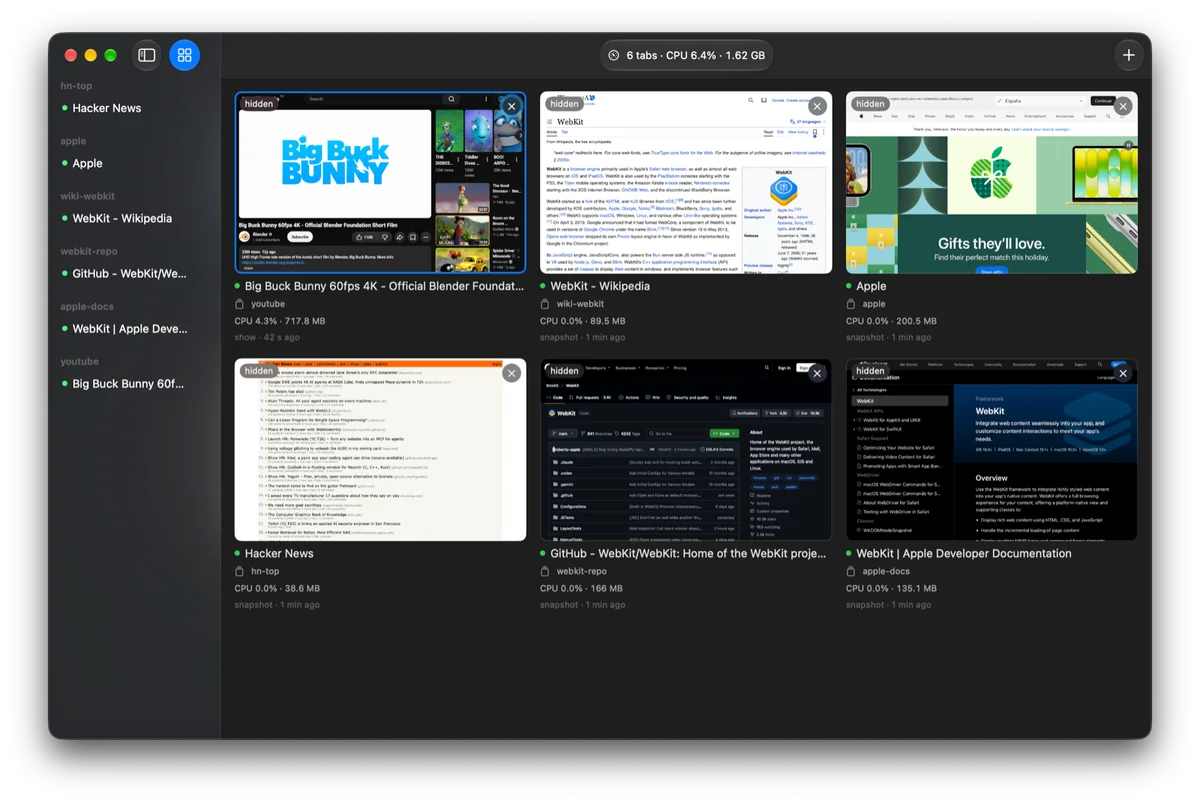
Agent sessions are organized by tabs in the sidebar. The UI updates in real time with workspace statuses on the left and live DOM previews on the right, making it obvious if any background task is stuck.
Token Accounting: Why Action-level DOM Diffs Save Millions of Tokens
When building browser agents, people often check whether tasks succeed, but rarely calculate token expenses.
In traditional flows, every time an agent takes an action on a Single Page Application, it requests a complete accessibility tree snapshot. On complex modern web apps, a formatted snapshot easily costs 8,000 to over 10,000 tokens. In a fourteen-step form workflow, dumping the full DOM repeatedly exhausts hundreds of thousands of tokens within thirty minutes. Who wants to tolerate massive token bills for a single test run?
Agweb implements an action-level DOM diff mechanism to fix this.
It assigns persistent reference handles like ref=e3 to interactive elements. As long as the node remains in the DOM, its identifier stays stable throughout the session. When the agent dispatches a click or fill command, the daemon only returns the incremental DOM changes triggered by that specific action instead of dumping the whole tree.
Remember to wrap attribute selectors in single quotes in the terminal. When I first tested this, I used double quotes out of habit, and zsh stripped the bracketed content as a wildcard expansion, throwing a puzzling no such element error:
# Assign dedicated workspace and open target page
agweb -w task open https://en.wikipedia.org/wiki/WebKit

# Extract clean interactive node tree
agweb -w task snapshot

# Wrap in single quotes to prevent shell quote stripping
agweb -w task click 'role=button[name="Main menu"]'
The CLI responds with an incremental report without redundant tree data:
### Changes
  - navigation "Site" [ref=e2]
-   - button "Main menu" [ref=e3]
+   - button "Main menu" [checked] [expanded] [ref=e3]
+   - list [ref=e1167]
+     - listitem [ref=e1168]
+       - link "Main page" [ref=e1169]
The difference is clear: the button node state changed to expanded, revealing a new list and link elements below.
The agent receives the newly exposed ref handles immediately without calling another costly snapshot. In an internal expense form workflow, the traditional full snapshot flow consumed 118,000 tokens across 14 interaction steps. Switching to incremental diffs reduced total usage to 36,000 tokens, shrinking overall context volume by nearly 70%. The tokens saved were enough to run two additional full regression runs on the same day.
Credential Security: Keeping Passwords Out of LLM Transcripts
Traditional automated login scripts carry a major privacy flaw: to let the browser fill password fields, many tools pass plain-text secrets directly into LLM tool-call arguments.
This means credentials and one-time tokens get recorded inside cloud model inference logs and local chat transcript files. Exporting logs to share with teammates leaves passwords fully visible. Who wants to accept that security leak?
Agweb uses an external credential injection pipeline instead.
When dispatching input commands, agents pass a secret-cmd flag pointing to local secret stores such as pass, 1Password CLI, or Bitwarden CLI:
# Password decrypted by local pass utility and injected directly into WebKit form
agweb -w task fill "#password" --secret-cmd "pass show internal/staging-db"
The handshake executes entirely inside local system processes. The agent only receives a boolean confirmation that the field was filled. Passwords never touch standard output or LLM context windows, physically closing off cloud leaks.
For multi-agent setups, Agweb supports named persistent profiles. By adding -p work, multiple workspaces share the same authenticated browser session. Once a primary agent signs in, auxiliary agents reuse the session without re-authenticating.
Keep in mind one engineering edge case: if an agent triggers a logout or invalidates cookies during testing, every worker bound to that profile drops offline simultaneously. Watch for this when debugging concurrent agent runs.
Local Compilation, CLI Setup, and Frequent Commands
The software currently requires macOS 26 or newer. Official GitHub Releases provide prebuilt Agweb.dmg disk images. Building from source is also straightforward:
# Clone source repository and run build script
git clone https://github.com/paul-nameless/agweb.git
cd agweb
./scripts/build.sh

# Symlink compiled executable to system path
build/Agweb.app/Contents/Helpers/agweb install-cli

# Register automation skills for Claude Code and Codex
agweb install-skill
Once configured, these daily CLI commands handle most tasks:
# Open target page, daemon launches automatically if inactive
agweb -w work-01 open https://news.ycombinator.com

# Extract clean Markdown text content from current page
agweb -w work-01 text

# Delegate CAPTCHA or 2FA verification to human without taking focus
agweb -w work-01 ask "Please confirm the SMS verification code in the window"

# Record session video to MP4 format
agweb -w work-01 video-start ./session-demo.mp4
agweb -w work-01 click 'text="Submit Order"'
agweb -w work-01 video-stop
Hard Limits: When Should You Skip Agweb?
After covering the strengths, we must lay out physical limitations and trade-offs clearly. There is no free lunch in engineering.
Three hard boundaries exist:
First, it is strictly tied to macOS and native WebKit. If you need headless CI automation inside Ubuntu, Debian servers, or Linux Docker containers, Agweb cannot run at all. Stick with Playwright and do not waste time here.
Second, it lacks Chrome-specific CDP support. Built on WebKit, it cannot run Chrome extensions or utilize specialized Chrome DevTools protocols.
Third, anti-bot circumvention is limited. It includes uBlock Origin rules updated every four days, but only handles static domain and CSS element filtering. It cannot bypass aggressive Cloudflare Turnstile or dynamic fingerprint challenges. Faced with advanced anti-scraping walls, stick with interactive browser setups rather than forcing headless scripts.
If you work on a Mac, feel frustrated by Playwright stealing keyboard focus, and run Claude Code or Codex locally, Agweb is worth testing. Build it and test an internal portal to see if your cursor finally stays where it belongs.